Dutching
Included in Standard, Plus, & Pro (market coverage varies)
Benefits

Scans a huge range of bookies, leagues, and markets. Check out our market coverage page to see what is included on each tier.

Use advanced filters to find the bets that suit your goals. Save your settings in the Filter Manager for fast, easy access to your most profitable setups.

Finds hundreds of arbitrage bets daily. Lock in profits by betting across bookies with odds that guarantee a win no matter the result.
FAQs
Which bookies are covered on the software?

We have data for almost every bookie in Australia, and are always adding more. To see which bookies are included on each tier please check our Market Coverage page, where you can also see a list of the included leagues and markets.
Can I use it on mobile?
Yes, the software is fully mobile compatible. We even have a mobile-friendly layout which makes it easier to view the data on smaller screens.
Which membership tier do I need for arbitrage bets?
Arbs can appear on all tiers of the software. However, the most common place to find arbs is in the Lines and Totals markets that are exclusive to the Pro tier.
Other Features




How Dutching Works
Dutching is a way to turn over your bonus bets and lock in value by covering all the outcomes across different bookies, without needing a Betfair account. The software finds those opportunities for you and lays everything out clearly. The Plus and Pro versions differ mainly in the number of markets available: Pro adds extra markets like player disposals, points, assists and rebounds, so you get more options and more value. Plus still gives you plenty of good bets to work with. You can check the market coverage page to see exactly what is included on each tier.
Reading the table
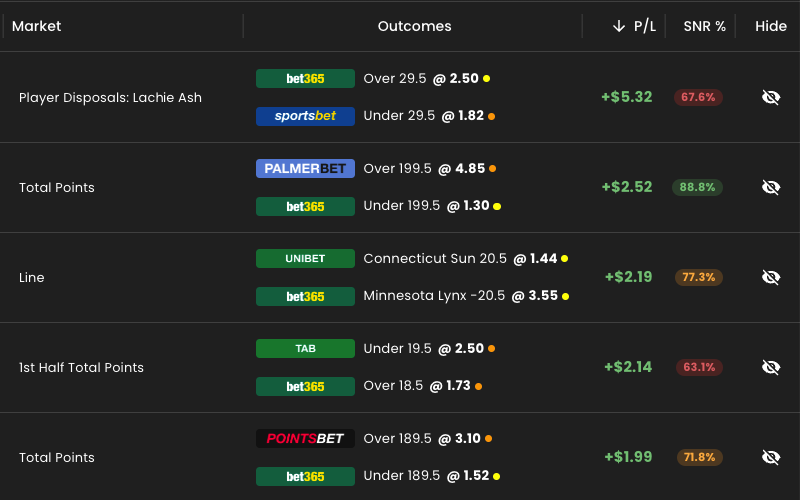
Everything is laid out left to right so it is quick to scan:
- Day, sport, league and event: what the bet is on.
- Market and bookies: the market, and the bookies you would dutch between.
- Odds and refresh dots: the odds at each bookie, with a small dot showing how fresh they are. Orange or red means the odds may be stale, so hit refresh to update them. You can also turn on auto refresh, which updates the data every 30 seconds while the software is open.
- Profit margin and SNR: shown as percentages, so you can quickly see the value in each bet, especially for turning over SNR bonus bets.
- Hide: hide any bet you have placed or are not interested in, and use unhide all to bring them back.
The calculator
Select any row and the calculator opens with the outcome, bookmaker, odds, stake, liability, return and profit. Switch to the SNR value when you are turning over a bonus bet and it recalculates everything for you. A couple of things worth knowing:
- Rounded stakes: switch on rounded mode so your stakes stay tidy and natural looking, rather than the unusual amounts that can make you stand out at the bookie.
- Manual edits: you can type in your own stake or adjust the odds by hand if they have moved at the bookie, and pick the best bookie from the dropdown.
- Big margins: if a bet shows an unusually large profit margin, the calculator flags a warning, because those are rarely worth taking. There is a link with more information if you want to understand why.
Customising the view
You can show or hide any column, drag columns wider or narrower, and reset the widths at any time. Compact mode reshapes everything for a tablet or phone, with your profit and SNR values down the side, and the sort settings let you bring the best SNR bets straight to the top.
Filters
There are ready-made filter models to get you started, such as high SNR or major soccer leagues, and you can build your own from scratch. Filters support different operators and AND or OR logic, so you can be as simple or as specific as you like, for example SNR above a certain percentage within the next few days at a particular bookie. Save your filters to reuse them. There is also a quick filter: just type a bookie or a league, like Sportsbet or NBA, and it instantly shows the available markets for it.
The short version
The Dutching software is a flexible, easy way to turn over your bonus bets and find value without an exchange. Start free with a BonusBank account and take a look.
Start Earning Today.
Join the 20,000+ Australians using Bonusbank to turn bookmaker bonuses into tax-free profit.
Get Started FreeFree beginners course · No credit card needed · Takes 2 minutes