The ATM
Included in all tiers (market coverage varies)
Benefits

Scans a huge range of bookies, leagues, and markets. Check out our market coverage page to see what is included on each tier.

Customisable to your needs via advanced filters. Save multiple filter options in our Filter Manager to quickly access the bets you are most interested in.

Combines with our ‘ATM Alerts’ Chrome extension so that you can be notified of the best bets even when you are not viewing the ATM.
FAQs
Which bookies are covered by the ATM?

We have data for almost every bookie in Australia, and are always adding more. To see which bookies are included on each tier please check our Market Coverage page, where you can also see a list of the included leagues and markets.
Can i use it on mobile?
Yes, the ATM is fully mobile compatible. We even have a mobile-friendly layout which makes it easier to view the data on smaller screens. The only thing you won’t be able to use on mobile is the ATM Alerts chrome extension.
Do i need a Betfair account to use it?
Other Features




How The ATM Works
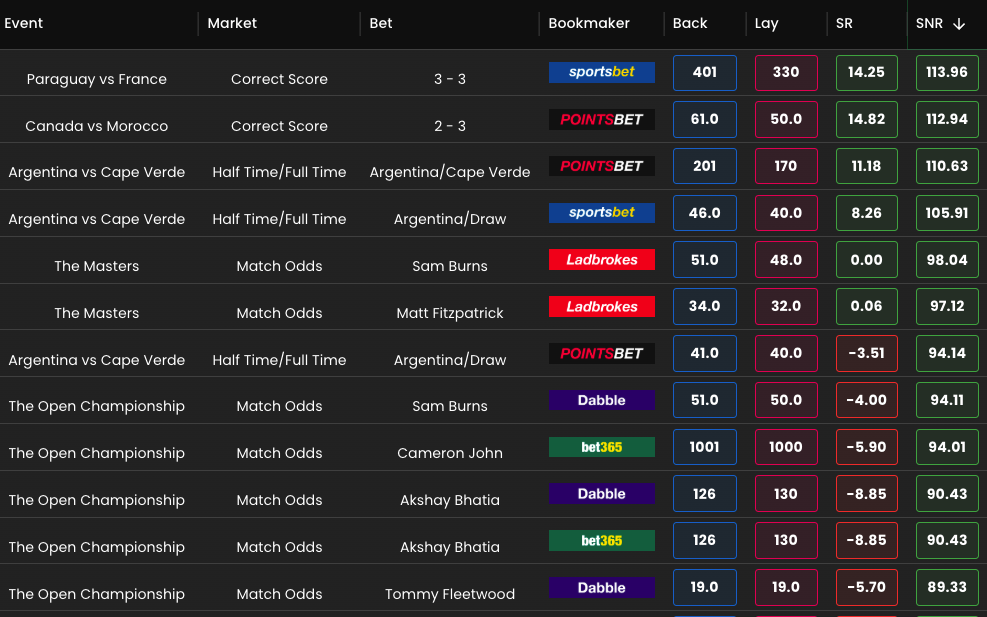
The BonusBank ATM finds your best bonus bet conversions across every bookie and shows you the value at a glance, so you always know the best bet to place. It compares the back odds at the bookies against the lay odds at Betfair, works out how much of your bonus bet you keep, and lets you jump straight to the market to place it. Here is how it works, from the free version through to the full tool.
Getting started with the free ATM Lite
The ATM Lite is the free version included with a free BonusBank account, and it is there to help you get started. It is limited in the number of bookies, markets and sports you can look at, so you will not see as much value as the paid tiers, but it is enough to learn the ropes and place your first conversions. On the free version you get a couple of sports, the main match odds and over/under markets, and two of the bookies you will most likely start matched betting with.
The ATM is sorted by the best SNR value by default, which is what you use to convert your bonus bets. For each selection you can see the bookie back odds, the Betfair lay odds, and exactly how much of every $100 bonus bet you would turn into cash. If you want to place mug bets instead, you can switch across to the SR value.
More value as you upgrade
As you move up through the subscriptions you unlock far more sports, markets and bookies, and with that comes a lot more value. On the higher tiers you will also see stronger numbers across the board. The Plus and Pro tiers are similar on the ATM itself, because many of the extra Pro markets are not layable at Betfair and are more relevant to the value betting and middles tools.
Customising the ATM
The ATM is built to be set up however suits you. From the top of the tool you can:
- Refresh the odds manually, or switch on auto refresh to update every minute.
- Switch between light and dark mode.
- Apply a Betfair commission discount if you have one, and every value updates to match your discount.
- Set your stake. The default is 100, which lets you read the SR and SNR columns as percentages, but you can change it to your actual stake and the numbers update to suit.
Understanding the columns
Every column is designed to be quick to read, with a few handy extras:
- Date: click a selection’s date to switch it to a countdown view.
- Sport: shown as an icon to save space.
- League and event: the competition and specific match or event.
- Market and selection: the market you are looking at, and the exact selection to back at the bookie and lay at Betfair.
- Bookmaker: shown with a symbol for each bookie.
- Back and lay odds: the back odds at the bookie and the lay odds at Betfair. Click the back odds to open that market at the bookie, or the lay odds to open the matching market at Betfair, so you never have to go hunting for it.
- SR and SNR values: click a value to open the calculator for that selection, which gives you the exact amount to lay at Betfair, your liability, and your profit. You can also click the selection to copy it, ready to paste into Betfair.
- Liquidity: the amount available to be matched at Betfair for that selection.
You can also show or hide any column from the top left, drag columns wider or narrower, and reorder them so the tool looks exactly how you want it.
Filtering
The filters let you narrow everything down fast. You can filter by sport, league, market, event, bookmaker and bet type, set how many days or hours out you want to look, and set minimum and maximum back and lay odds. You can also set a minimum SR rating, a minimum SNR rating, and a minimum liquidity, so you only ever see the selections worth your time.
Saving filters with the Filter Manager
The Filter Manager lets you save as many filter setups as you like. Build a set of filters for, say, converting bonus bets, name it and save it. Build another for finding mug bets between certain odds, and save that too. From then on you can switch between your saved filters in a couple of clicks, and the whole tool updates instantly.
The short version
The ATM is quick, fully customisable, and does the hard work of finding your best bets for you. Start free with a BonusBank account and give it a go.
Start Earning Today.
Join the 20,000+ Australians using Bonusbank to turn bookmaker bonuses into tax-free profit.
Get Started FreeFree beginners course · No credit card needed · Takes 2 minutes